Why this test?
The NVIDIA DGX Spark is a rather exceptional machine: a desktop-sized AI supercomputer, powered by the Grace Blackwell Superchip GB10. It's a chip that combines a 20-core ARM CPU and a Blackwell GPU on a single package, with 128 GB of unified memory shared between both. All plugged into a standard wall outlet.
On paper, it promises to run very large models locally, without cloud, without subscriptions, without sending your data anywhere. I wanted to verify this in practice, on a concrete use case: text-to-image generation.
I wrote an interactive notebook in Marimo (a modern alternative to Jupyter) that lets you pick a model, enter a prompt, adjust parameters, and generate an image with a real-time progress bar. I then ran 11 different models under the exact same conditions to compare speed, quality, and memory consumption.
What exactly is the DGX Spark?
The DGX Spark is not a souped-up gaming PC. It's a machine designed from the ground up for artificial intelligence, in a compact form factor that fits on a desk. Its main feature: unified memory. The CPU and GPU share the same 128 GB pool — which means you can load very large models without worrying about VRAM, which is often the bottleneck on traditional setups.
What's notable is that the limit here isn't memory (128 GB is considerable) but memory bandwidth: 273 GB/s shared between CPU and GPU, compared to several TB/s on a datacenter H100. That's the real bottleneck of this machine for intensive AI workloads.
The test notebook
Rather than running command-line scripts, I built an interactive interface in Marimo. The idea: pick a model from a dropdown, adjust parameters (number of steps, guidance scale, seed, aspect ratio) and generate images with real-time visual feedback. After each generation, the parameters are automatically saved to a JSON file for reproducibility and comparison.
The core loading function is intentionally simple — the Hugging Face diffusers library does the heavy lifting:
All models are loaded with the bfloat16 data type to balance precision and memory usage. The local_files_only flag ensures models are loaded from local disk, with no network calls during generation.
For the benchmark, I kept exactly the same parameters across every model:
- Identical prompt: "A 35 years young woman in paris during spring. Blond hairs, green eyes. 35mm, professional photographer."
- Fixed seed:
42(for reproducibility) - 50 inference steps
- Guidance scale: 4.0
- Resolution: 1024×1024 pixels
The 11 models head to head
Here's the full measurement table. Generation time is the pure diffusion time (excluding model loading). Memory indicates the peak GPU memory measured during generation.
| Model | Family | Loading | Generation | Duration | Memory |
|---|---|---|---|---|---|
SD 3.5 medium stabilityai/stable-diffusion-3.5-medium |
SD 3.5 | 66s | 34s | 22 GB | |
Z-Image-Turbo Tongyi-MAI/Z-Image-Turbo |
Z-Image | 63s | 178s | 22 GB | |
Z-Image Tongyi-MAI/Z-Image |
Z-Image | 120s | 179s | 22 GB | |
SD 3.5 large stabilityai/stable-diffusion-3.5-large |
SD 3.5 | 171s | 82s | 29 GB | |
SD 3.5 large turbo stabilityai/stable-diffusion-3.5-large-turbo |
SD 3.5 | 171s | 82s | 29 GB | |
FLUX.2-klein-9B black-forest-labs/FLUX.2-klein-9B |
FLUX.2 | 266s | 95s | 66 GB | |
FLUX.1-schnell black-forest-labs/FLUX.1-schnell |
FLUX.1 | 291s | 110s | 72 GB | |
FLUX.1-dev black-forest-labs/FLUX.1-dev |
FLUX.1 | 284s | 111s | 95 GB | |
FLUX.1-Kontext-dev black-forest-labs/FLUX.1-Kontext-dev |
FLUX.1 | 289s | 111s | 66 GB | |
Qwen-Image-2512 Qwen/Qwen-Image-2512 |
Qwen | 427s | 212s | 63 GB | |
FLUX.2-dev (4-bit) diffusers/FLUX.2-dev-bnb-4bit |
FLUX.2 | 265s | 397s | 34 GB |
The generated images
All images below were generated with the same prompt, the same seed (42) and the same parameters. Only the model changes — making the comparison directly readable.
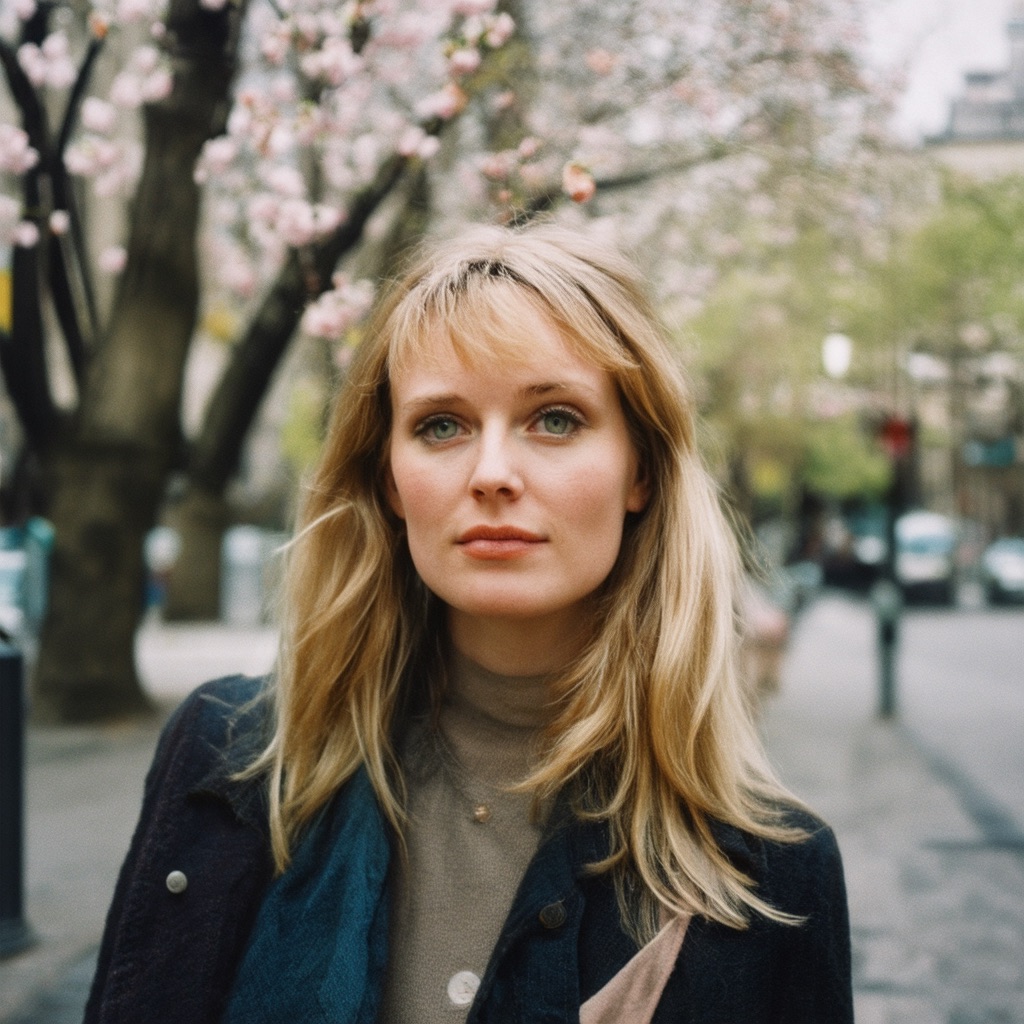










Prompt: "A 35 years young woman in paris during spring. Blond hairs, green eyes. 35mm, professional photographer." — 1024×1024, 50 steps, guidance 4.0, seed 42.
Benchmark takeaways
34 seconds of generation, 22 GB of memory. Remarkable speed/quality ratio.
397 seconds — paradoxical for a quantized version meant to be lighter.
Impossible to run on a setup with less than 80-90 GB of VRAM.
Only 22 GB — accessible on far less expensive setups.
4-bit quantization: not always a win
The FLUX.2-dev-bnb-4bit version is a 4-bit compressed version of the FLUX.2-dev model (instead of 16-bit) to reduce its memory footprint. Result: 34 GB consumed instead of 66. On paper, that's a great idea.
But in practice, it's the slowest model in this benchmark: 397 seconds of generation, or 3.5× slower than FLUX.2-klein which uses the same amount of memory. Quantization has a computational cost that the GB10 struggles to offset — likely due to the DGX Spark's limited memory bandwidth (273 GB/s) which amplifies this overhead.
SD 3.5 large = SD 3.5 large turbo?
Identical results on both: 171 seconds loading, 82 seconds generation, 29 GB memory. The two models were likely optimized for the same performance targets. The "turbo" label normally means fewer steps needed for good quality — testable with fewer than 50 steps.
Z-Image vs Z-Image-Turbo: same story
Both Z-Image variants (from Tongyi-MAI) are virtually identical in timing: 178 and 179 seconds. The difference between them might show more with a reduced step count.
The DGX Spark: a machine built for large models
What this test clearly shows is that the DGX Spark shines through its memory capacity far more than its raw speed. Models like FLUX.1-dev (95 GB) or Qwen-Image (63 GB) are simply impossible to run on a standard GPU, even a high-end one. Here, they run — slowly at times, but they run.
For high-throughput production, this isn't the right machine. For exploration, prototyping, or testing massive models locally without cloud or subscriptions, it's a one-of-a-kind proposition.
My takeaway
The DGX Spark is a fascinating and somewhat unconventional machine. It's not the fastest GPU for image generation — an RTX 5090 with 32 GB of VRAM would likely be faster on models that fit in memory. But it's a machine that can run anything, locally, with no VRAM constraints, with NVIDIA's full CUDA stack.
For anyone who wants to explore state-of-the-art image generation — or LLMs — without depending on the cloud and without being limited by memory, it's a remarkable tool.
The next step will be to test these same models with more complex prompts and varying step counts — to see if "turbo" really lives up to its name with 10 or 20 steps instead of 50.